Showing posts with label birthday card. Show all posts

Sunday, July 26, 2026

A Masculine Watercolor Birthday Card and a Card for a Friend.


Hello Crafty Fiends and Happy Watercolor Weekend!

Today, I want to share two projects that are completely different in purpose.

For the first project, a friend asked me to create a masculine watercolor birthday card for her husband. Knowing he loves the ocean and owns a boat, I designed the card with that theme in mind.


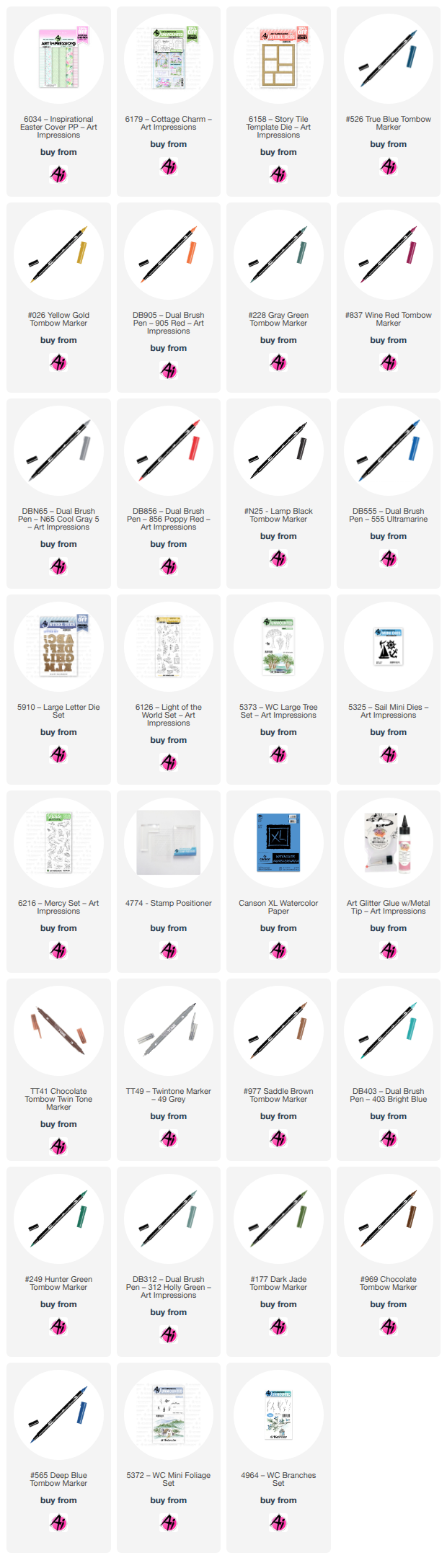
To start, I used the lighthouse and cliff stamps from the Light of the World set (6126). I inked everything except the tree using Tombow markers 969 and 565, and stamped the tree using Tombow marker 177. I then pulled the colors from the stamp and painted the lighthouse and the cliff.


Next, I painted the tree and some background foliage using branches from the Branches Set (4964) and the Large Tree Set (5373). I also added the sky.


To add the ocean, I drew a line and masked the sky to create a straight horizon. I built up the ocean using different shades of blue, and then added a few wave lines using bleed-proof white. I kept it looking like a calm ocean without too much foam or waves.


For the sentiment, I used the Large Letter Die Set (5910) to cut the letters "HPPY" three times—twice in white and once in blue. I layered and glued them together with the blue letters on top. For the letter "A", I used the sailboat from the Sail Mini Dies set (5325). I added a few lines to one of the sails using a red marker (856) and a little gray for shadow. Finally, I added a "Birthday" stamp and cut a coordinating blue mat to be glued around the card.


I am really happy with how this card turned out, and I hope you like it, too!


                                              My second card:  Thinking of You card


I want to share the details of the second card I made. I am making this card for a friend who is going through a difficult time, and I hope it brings a smile to her face and lets her know that I am thinking of and praying for her.

Since she loves birds, I designed this card specifically with her in mind:


  - Background & Stamping: I started by sketching the paper using the die from Story Tile Die Set (#6158) and then stamped the birds from the Mercy Set (#6216). I left one space open for a sentiment from the Cottage Charm Set (#6179). 


- Painting: To give the birds a realistic look, I researched different sparrow species online for reference. Once the painting was dry, I applied a thin layer of Distress Glaze to seal it.    


 - Assembly: I cut the frame twice—once in black and once in kraft paper for the top layer. Finally, I glued the frame and mat together onto a matching kraft-colored card base.


Thank you for taking the time to read my blog. I hope these cards inspire your own creations. Please feel free to reach out if you have any questions.

Happy crafting and watercolor painting!


Monday, April 1, 2024

Say It With Sentiments #4 April Guest Designer Challenge with Dori Mendiola

 Hello everyone!

We hope you all had a wonderful and relaxing Easter yesterday.

Last month, Dori M was our winner.

She created an adorable magic picture changer interactive card which led me to her
blog. As I looked through all of her work I fell in love! She went from being our April Guest Designer
to being asked to become a permanent DT member. Fortunately she said yes. You will begin
seeing her work each week later this month.

Before we share Dori's April inspiration card let's see who we've selected to be our May Guest Designer.  The challenge theme was Timber. Use trees, branches, stumps, bushes etc.


We LOVED all of the entries but we thought that #8 Diana S. stood out this time.
Maybe it's her beautiful pink cherry blossoms. They'll be here before you know it.
(At least where I live)


Diana will be our Guest Designer for May.
We look forward to seeing what she creates for her challenge feature.


Diana, please contact Leah at Feedback@artimpressions.com
to claim a free stamp set of your choice and she will give me your email address so that we can 
begin brainstorming for our May challenge when you will be our Guest Designer!

Now for our Lucky Random Winner who will receive the
 Exclusive Mouse Freebie EXW5539 from 2022.


#5 Rhonda F.


Congratulations Rhonda!
Please contact me at Renee@artimpressions.com to claim your free stamp.

---------------------------------------------------------------------------------------------------------------------


Now to introduce our April Guest Designer.

As we said, Dori was selected but once we saw her amazing work?
We just HAD to ask her to be a full time designer. Here is her Guest Designer card for our "Say it with Sentiments" challenge. From here on out, she will be an official Art Impressions Daily Design Team Member!

  Happy April everyone.  My name is Dori and I am thrilled to have been chosen to be the Art Impressions' guest designer for April.  I was first introduced to Art Impressions by Sharon Caudle, AI design team member, back in 2014, when I took her copic class at a local scrapbook store and she used an image from the AI Girlfriends stamp line.  They are so funny and reflect fun times with your friends.  Now, my girlfriends and I have aged and the AI Laugh Lines stamp sets are more representative.  Ha Ha!   I love all of the Art Impressions stamp sets and they are my “go to” when making cards for friends and family. 


  My theme assignment for April is “Say it with Sentiments”.  I have been wanting to make a reveal wheel card for the longest time, so I thought it would be perfect for this months challenge.  It’s very simple to make and no special dies are needed. 

To make the mechanism, 


I cut one 1” circle,  three sawtooth edge circles (you can use a circle or scallop edge circle) approx. 4” in diameter – one from copy paper, one from colored cardstock and one from heavy weight cardstock.  If your colored cardstock is thick and sturdy, you can eliminate the third piece, otherwise, glue the heavy piece behind the colored cardstock for stability.  This is the wheel so you want it to be strong.  Take the ‘copy paper’ circle (template) and fold in half and then half again to make four quarters.  Make a small hole where the folds cross together (center point).  Place template over cardstock circle and make similar hole.  Take your template and cut your shape in all four quarters, near to the center.  I used a balloon, but you can use a star, circle, speech bubble, etc.,  whatever fits in each quarter and also fits your sentiments or image.


Place your colored cardstock in your stamped platform (using a sticky mat is helpful) and place the template over top.  Place your stamps within the die shapes and close the platform lid.  Remove the template and stamp your sentiments.  I used sentiments from the “Birthday Laugh Lines” and the “Be Happy Laugh Lines” stamp sets.  Take the 1” circle and make a small hole in the center (does not have to be exact).  Place a brad up through the small circle and then through the wheel circle.  Your mechanism is finished and ready.

For the card, I stamped the man from the “Birthday Laugh Lines” on a 4.5” x 6”  piece of cryogen white cardstock using memento black ink and colored him with copic markers (see colors below).


 I then die cut the balloon shape over the top of the stamped balloon image.  I lined up the reveal wheel behind the balloon hole only to determine where to place the largest rectangle die on the cryogen cardstock.  I taped the rectangle die in place, removed the wheel, and ran it through my die cut machine.  I then cut a partial circle on the side of the cryogen to match up with the turn part of the wheel.  Optional: Mat the image and cut corresponding partial circles to line up.  Make sure that the sentiments do not show through the partial circle when turning.


Hold the wheel where you want it and turn the image (and wheel) over and place foam tape on the back side of the small circle and around the edges of the back side of the colored image piece, making sure not to place any foam tape on the wheel.  Remove all the tape coverings and carefully turn back over and place on your card background.  Test your wheel and you are now ready to put the finishing touches on your card.    

 
  I hope you enjoy my card and decide to play along with this challenge.  It truly is fun!! 


Products used: 

  Copics:  

Skin – E13, E11, E01, E00

Cane and shoes – E37, E35, E33

Pants – B26, B24, B23, B21

Hat – B24, B21 & YR07, YR65

Shirt – YR07, YR65, YR61

Ground and hair – N3, N1 and N0


-------------------------------------------------------------------------------------------------------------------
I also have a little bonus prize!

For as long as I have duplicate stamps I will choose a random winner.
These will be for U.S. residents only since these will be mailed by me personally
and not Art Impressions.

This month I have the Exclusive Mouse Freebie from 2021.
You will be automatically entered to win when you upload your project to the challenge.


Good luck everyone!


Here is the fine print:

✻ Please make a new card or handmade crafty creation.
✻You can make any item you wish; this is not limited to cards!
✻ Limit two submissions per person. 
✻You MUST use Art Impressions stamps or dies! You may use other companies products but the main focus should be on Ai items.
✻If you win, you will receive one free stamp set of your choice. In return you will create a brief write up explaining how you made your item and email it to me. (ReneĆ©) and you will mail your project to Art Impressions at your expense. (cheapest method possible is fine) International winners may submit photos through email. We will share your creation on Art Impressions social media.
 ✻Please include your first name and last initial on your submission.
✻We love to comment on your entries, but keep in mind if you use a private group or a platform that you need to sign up for, we probably won't be able to.
✻ The Ai Challenge is open to everyone, international submissions are welcome!
✻ Include a link back to the Ai Blog or grab our button on the top right of our sidebar!
✻ Share the Ai love if you can, by clicking and commenting on your fellow crafters.
✻ Make sure to get your link up by the deadline to enter your creations.
✻ Good luck and happy crafting!


You are invited to the Inlinkz link party!

Click here to enter

Friday, June 2, 2023

To the Birthday Boy Card by Tasha!

 Happy Friday Ai Fans!

Tasha here sharing a new card created with the 5044 - Born To Ride Set. This stamp set is perfect for Father's Day projects, masculine birthday cards, and scrapbook layouts. I just LOVE this biker stamp! 


The image was stamped with black ink and colored with Copic Markers. I wanted it to look like the biker was cruising down the road on a warm Summer day, so I drew in a road and added some grass.

Also, since it's almost time for the 4th of July, I thought it would be fun to add an Americana theme to the design. To do this, I colored the bike red, used red, white & blue colors on his bandana, and I attached a festive star pattern paper. I just love these colors!


This stamp set includes several sentiments, but I used the "To the Birthday Boy" greeting from the 5735-Birthday Sentiment Set. I think this birthday set has become my go to for cards and love that it includes a masculine greeting. 


To complete the card, I attached several white enamel dots and layers of red cardstock and silver foil paper. When I think of motorcycles, I think of shiny chrome, so the silver foil totally goes with the biker theme. 

Also, be sure to check out the Ai Site for their Father's Day Sale!


Thank you for checking out today's project and I hope you all have a wonderful day!


Saturday, May 6, 2023

Hoppy Birthday by Janet


Hello Art Impressions fans! I have a fun but simple card you can make. This is a window card. When you open it, the full image of the frog on in the flower is revealed. Isn't he cute? It's one of the images from 5283 Frog Set. 


First, I created an A2 card base and cut a heart window out using the 5721 Nested Heart Dies. Then I cut a smaller front panel and embossed it. I cut another heart out of the panel with the Nested Heart Dies before I mounted it on foam tape and placed it on the card front. I used the largest scallop die and the window die to create a frame using a plaid paper from 5741 Valentines Paper Pack. I used a sentiment from the Frog Set to put on the card front. Finally I added pink pearl bling to the 
simple white card.

COPIC MARKERS USED:
Flower: R85, R83, R81
Greens: G99, YG63, G24, YG25, GY23
Sky: BG11, 0

Thanks so much for stopping by today. I hope you'll stop by the store soon for all your 
card making needs. 

Wishing you a very crafty day!


Friday, February 24, 2023

Here's Tool You Cards by Tasha!

 Happy Friday Ai Fans!

Tasha here sharing three new cards created with the new 5729 - Tool Shed MB! I am a big fan of the Ai matchbook sets and I'm so excited for this tool shed theme! 

My first card has a red and teal color combination and I used paper from the 5606-Harvest Journal Paper Pack for the card base. I thought this pattern went well with the tool shed theme and I love the color! There is just so much detail in these little cards, it's amazing!

For the second card I made the base out of wood pattern paper to make it look like a shed. Since the wood background is dark gray, I colored the tools with bright colors to allow them to pop. I love the bright green, blue, and yellow colors! 
The third card is my favorite! I made a girly themed tool shed, because girls are handy too! The base was created with pink plaid paper from the 5606-Harvest Journal Paper Pack, this paper collection is fabulous! I also attached a wood pattern paper to the floor to separate it from the walls. I would totally have these colors if I had a tool shed!
I hope you enjoyed today's projects and are inspired to create a matchbook card with the new 5729 - Tool Shed MB!

Have a wonderful day!


Thursday, January 5, 2023

Let's Celebrate! Challenge #342

Hello Ai fans!

Welcome to 2023 and another fun year of challenges!

We always award a Top Spot and a Lucky Random Winner.
That means approximately 50 people win a free stamp set each year!
Maybe this year you'll be one of them!

Our first challenge of the year is...

LET'S CELEBRATE!!

Before we get to the details let's take a look at our first Featured Designer of 2023.

Tasha created an adorable waterfall card for you and has the most incredible picture tutorial to go along with it.  We think you're going to love it!


Hi Ai Fans! 

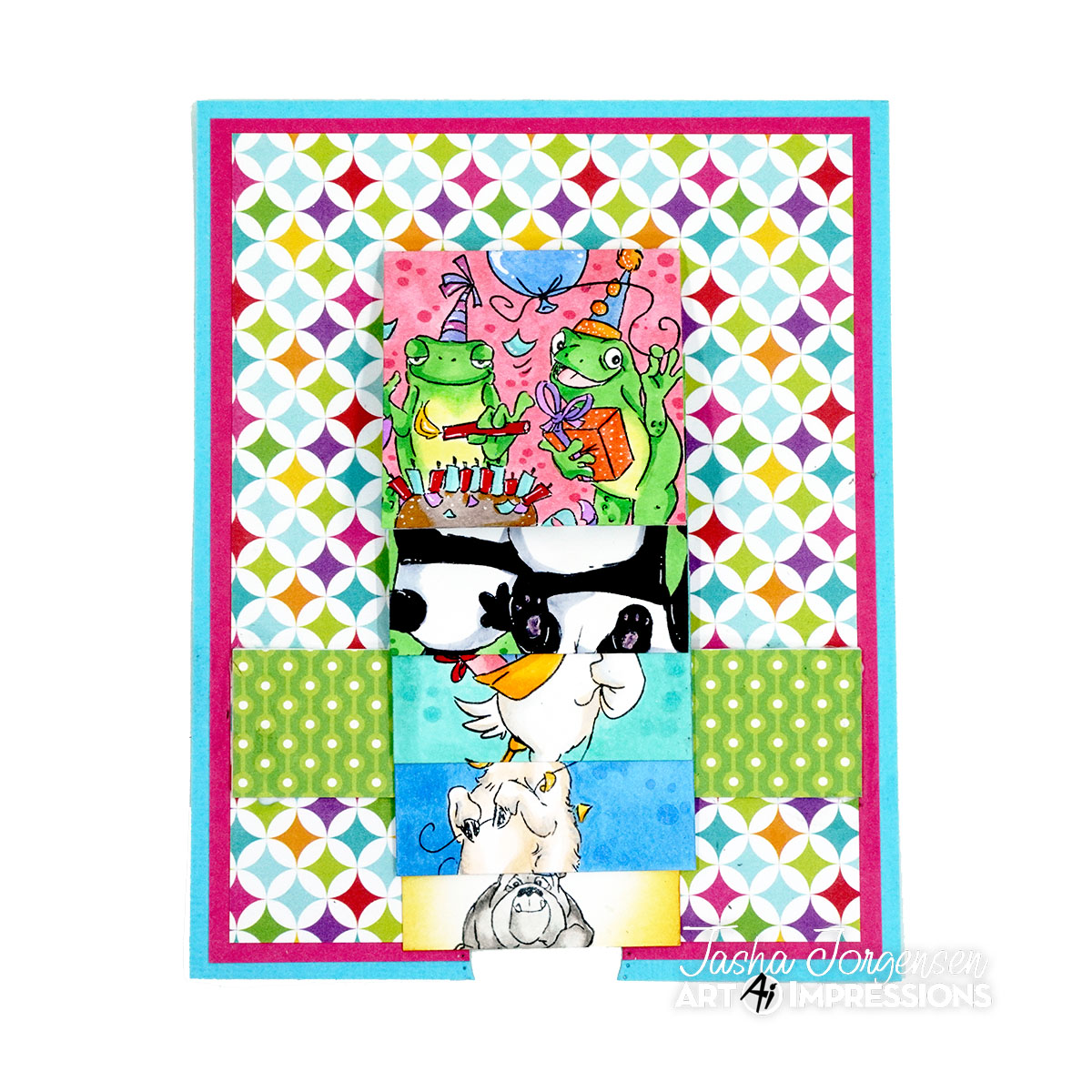
Tasha here sharing a colorful Waterfall Celebration Card created for the Ai "Let's Celebrate" Challenge!

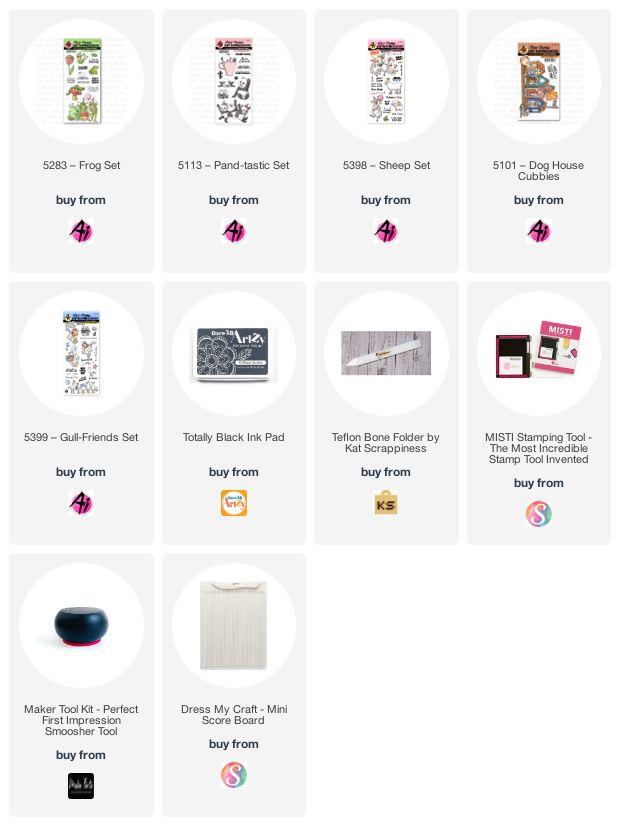
This challenge theme is perfect to start the new year and I wanted to have a card that looked like a birthday party. Instead of just using one set, I mixed and matched sets to look like party photos. This type of card would also work great for seasonal designs!

Instructions

Measurements: 
Completed card is 4-3/4" x 6"

Step 1: Cut your base and paper layers.
  • Card Base: 4-3/4" x 6"
  • Layer 1 (Light Blue): 4-3/4" x 6"
  • Layer 2 (Pink): 4-1/2" x 5-3/4"
  • Center card (Pattern): 4-1/4" x 5-1/2"
  • Center Strip Panel: 1" x 4-1/2"
  • x4 Squares: 2" x 2"
  • Waterfall Base: 1-7/8" x 9"  
    • *Score at 2", 2-3/4", 3-1/2", and 4-1/2"


Step 2: Attach your center card and card stock layers.
Optional: If you want to create an opening to help pull down the waterfall, use a circle punch or die to cut the bottom.

Step 3: Add liquid glue to the Center Strip Panel as shown below. 
Note: I found that liquid glue works best for this step.


Step 4: Attach the Center Strip Panel to the Base Card as shown below. 


Step 5: Stamp your images on the four (4) square panels. 
Step 6: Using a bone folder, crease all the score lines on the Waterfall Base.
Step 7: Add adhesive to the top of each score line on the Front of the Waterfall Base. 
Step 8: Flip the Waterfall Base over and add adhesive to the middle of the bottom scored area. 
Note: I found that a strong tape works best for this step.


Step 9: Fold the Waterfall Base Card in half.
Step 10: Stamp a greeting on the Back side of the Waterfall Base on the opposite side of the score lines.


Step 11: Add your Square Panels to the Waterfall Base starting with the bottom layer.
Step 12: Slide the Waterfall Base through the Center Strip Panel, so the squares are on top of the Center Strip and the Stamped Greeting is under the Center Strip Panel.
Step 13: Position the Waterfall Base in the center of the card and gently remove the back tape. The tape should hold the Waterfall Panel on to the Center Strip Panel. 
Step 14: Pull the bottom of the Waterfall Card to flip through the colored squares.


I hope you enjoyed today's project and will join in the Art Impressions "Let's Celebrate" Challenge!


Thank you Tasha for teaching us how to make one of these fun cards!
Your directions were so clear and concise.  We can't wait to try one!

Now for our new challenge.
Let's Celebrate!!

This challenge is open to so many themes.
Anything you celebrate.

New Years, new baby, new house, retirement, birthday, new job, weddings, showers, graduations...anything your heart desires if it's something you celebrate.

If you'd like to join in our challenge be sure to link your project below...

✻ Please make a new card or handmade crafty creation. You can make any item you wish; this is not limited to cards!
✻ Limit two submissions per person. You will receive extra votes if you use Art Impressions stamps!
 ✻Please include your first name and last initial on your submission.
✻We love to comment on your entries, but keep in mind if you use a private group or a platform that you need to sign up for, we probably won't be able to.
✻ The Ai Challenge is open to everyone, international submissions are welcome!
✻ Include a link back to the Ai Blog or grab our button on the top right of our sidebar!
✻ Share the Ai love if you can, by clicking and commenting on your fellow crafters.
✻ Make sure to get your link up by the deadline to enter your creations.
✻ Good luck and happy stamping!


You are invited to the Inlinkz link party!

Click here to enter